That's the app. It opens, then it's gone. No error, no dialog, just the home screen again. Other times it sat on a spinner forever. Meanwhile in the iOS Simulator, the same build booted in and chatted happily.
This is the story of getting it working. As of my last run on October 8, Pie answers on my phone in at with nothing leaving the device, and the same runtime runs in a browser tab. At the bottom of this page you can boot it in this tab and fork its sentences with your mouse.
Numbers with a dotted line under them have receipts. Tap one to see where it came from.
What Pie is
Pie is a programmable inference engine from Prof. Lin Zhong's group at Yale, built mainly by In Gim (SOSP '25 paper). A normal LLM server is a box: prompt in, text out, one fixed loop in between. Pie runs a small program you wrote, called an inferlet, right next to the model. The inferlet drives every forward pass and owns the KV cache, which is the model's notes on everything it has read so far. So you can fork a conversation, rewind it, or invent your own sampler without touching the engine.
In July, Prof. Zhong suggested I try getting it onto a phone. That's where owning those notes starts to matter: memory is tight, the data is personal, and there's no server bill. Pie was built for servers, and some of its defaults show it.
Four ways to die
By August 11 I had real inference running in the Simulator: a Swift app with Pie embedded in the same process, tokens streaming into a chat bubble. It took three small changes, and Pulley was the real trick. iOS doesn't allow JIT compilation, and Pie runs inferlets on Wasmtime, which normally compiles WebAssembly to machine code on the fly. Wasmtime also has an interpreter called Pulley that generates no machine code at runtime, so inferlets run on that. An interpreter sounds slow until you remember what an inferlet does. It makes decisions. The math still happens in the engine.
Then on August 26 I put it on a real iPhone, and it turned out the Simulator had been lying to me. The Simulator is a Mac process, so it gets a Mac's generosity. The phone stopped the app four different ways. You're going to do the fixing.
Death 1. Nowhere to write
Pie keeps its state in $PIE_HOME, which defaults to ~/.pie. On iOS, ~ is the app's container root, and the sandbox makes it read-only.
PIE_HOME somewhere the app is allowed to write. Or just tap the folder.Death 2. The spinner that lied
Now the app stayed open and sat on "starting the engine" forever. Every button was disabled. No crash, no error, nothing in the logs I could see. I asked the group for ideas.
Hongseung Yu at Seoul National University, who makes LLMs fast on Android and doesn't have an iPhone to build on, read my code and found it from the other side of the world. One line, in the function that starts the engine, threw the error away.
Swift's try? turns an error into nothing, and _ = throws the nothing away. Tap the line.
Death 3. Four terabytes
Hongseung's other tip was to run it from Xcode and read stderr from the whole stack. That's where the disappearing act explained itself. Swift never saw this one: it's a Rust panic, and it takes the whole process down.
called `Result::unwrap()` on an `Err` value: failed to create memory pool mapping
Caused by:
0: mmap failed to reserve bytes
1: Cannot allocate memory (os error 12)
fatal runtime error: failed to initiate panic, error 3, aborting
The whole bug is printed in that number. Tap the two halves.
Hongseung read the number for me: wasm_max_instances = 1000 times wasm_max_memory_mb = 4096, Pie's server defaults. I checked the config and it matched byte for byte. Wasmtime's pooling allocator reserves address space up front, so a new WebAssembly instance can start instantly, and those defaults add up to .
Reserving costs nothing until something writes. It's like booking every room in a hotel because some guests might show up. A Mac shrugs and says sure. Hongseung also said to measure the real ceiling. My iPhone's largest single reservation, found by bisecting mmap at launch, is . Keep scrolling to see that to scale.
1 slot
4 GiB
The red square is the most one reservation can get on my phone. The blue one is a single Wasmtime slot.
So the fix he suggested is obvious once you can see it. Shrink both.
wasm_max_instances and wasm_max_memory_mb, on log scales.I settled on 4 slots of 128 MiB. A phone runs one inferlet at a time, so that's plenty. My first idea was to skip the pool and allocate on demand, because I was treating a reservation as if it cost real memory. Hongseung talked me into keeping a small one, which keeps the fast start. In's mainline allocates on demand, and that works too.
Death 4. Same disease, different organ
Now the engine booted, loaded the model, and died on the first forward pass.
ggml.c:1604: GGML_ASSERT(ctx->mem_buffer != NULL)
ggml_backend_sched_split_graph <- ggml_backend_sched_alloc_graph
Pie 0.4's CPU driver was built on ggml, and its scheduler budgeted for 219 graph nodes at about 20 KB each. That's a malloc that macOS grants lazily and iOS refuses. I estimated a turn on this model at a few thousand nodes.
September 21, 2026,
First token on a real iPhone.
to boot. to first token. . at peak. CPU only, Pie 0.4.
What it actually says
Seventeen days later, on a newer engine and a newer model with more parameters, this is a real reply on my phone at the real speed. It waits 0.24 seconds, then writes 68 tokens at .
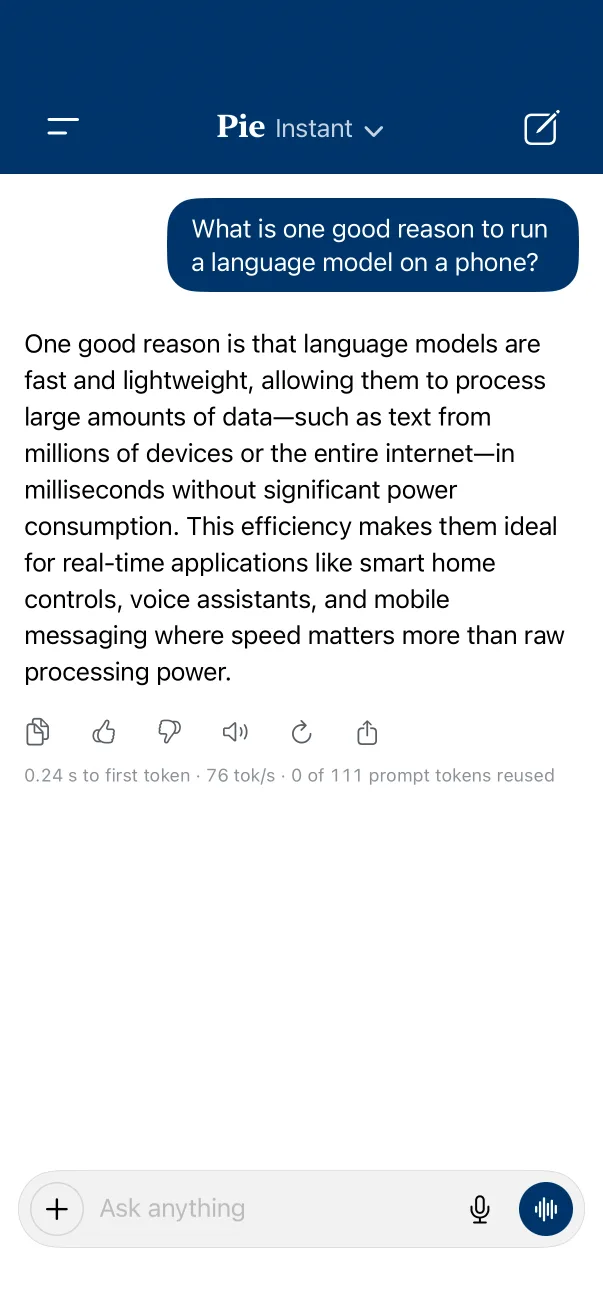
The screenshot the app took of itself on my phone. The one on the left is redrawn so it can replay.
"...large amounts of data—such as text from millions of devices or the entire internet—in milliseconds without significant power consumption." That's Qwen3.5-0.8B, 421 MiB in its phone build, and it will confidently tell you anything. I don't mind. At this size it's a stress test for the engine, and the engine passed. The open question, which Prof. Zhong asked me back in August, is how big a model this phone can run at a usable speed. I still owe him that answer.
Then I had to move
Pie 0.5, a rewrite, had come out on September 10, while I was still finishing on 0.4. The CPU driver I had built everything on was gone, replaced by real GPU engines. On October 2 Prof. Zhong asked me to move. Then I tried this.
$ cargo check -p pie --features metal --target aarch64-apple-ios
    Checking runtime v0.5.4
    Checking worker v0.5.4
    Checking pie v0.5.4
    Finished `dev` profile [unoptimized + debuginfo] target(s) in 47.80s
236c09246, zero code changes. I re-ran it for this post. It's only a type check, but the Metal engine compiles its shaders from source on the device, so there was nothing to cross-compile there.The only engine code that needed changing was the Wasmtime setup from Death 3. My side took more: a new inferlet, a rewritten shim and config, and a new model, because 0.5 has no Qwen3-0.6B. On October 8 it was running on the phone's GPU: to boot, to first token, , at peak.
Later that same day, In merged iOS support into Pie's mainline himself (#838). I want to be clear about this: his Swift package is the right way to use Pie on iOS today, and my fork isn't. What I got out of it was an app, a measuring harness and a good list of ways a phone is different.
Here's what a token passes through in the app I ended up with.
Why a follow-up question is cheap
Every token a model reads leaves notes in the KV cache. Throw the notes away and every new question means re-reading the whole conversation, which gets slower as the chat gets longer. The app keeps them between turns. This is a real five-turn benchmark on the phone, with scripted questions. Step through it.
Two details matter here. Reuse moves in chunks, because KV lives in pages, so every count is a multiple of 32. And with the inferlet I wrote for 0.5, it stops short of the last reply. The app resends the transcript every turn, the chat template replays a reply as different tokens than the model generated, and this model's recurrent state can only resume where a prefill chunk ended, so the inferlet saves one checkpoint at the end of the question. Each turn reads the previous reply plus the new question: in these runs, more after a long reply. My snapshot-based inferlet on Pie 0.4 read only 19 to 21.
It heard itself
Prof. Zhong's ask back on August 12, the day after the Simulator demo, was an app you could talk to. That's the app that kept dying above. Speech goes in, Pie answers, speech comes out, all on the device. On the real phone in October, the problem was that the speaking and the listening worked at the same time. This is a real conversation from my phone's saved chats, in voice mode, on the night of October 8.
The reply leaked past the echo canceller, the recognizer wrote it down with mistakes ("I don't have any personal experiences" became "Don't have your personal list"), and an exact-word filter decided that must be me. So the app cancelled its own reply and answered itself.
The fix is a filter that judges anything heard during or just after a reply against the reply's own words, tolerant of misheard ones, plus cleaner audio going into the echo canceller. Afterwards, voice mode ran six rounds with nobody talking and took itself for the user times. No echo even reached the filter in that run, so the new audio path gets the credit there. A stop quiets the playback channel in , the engine lets go of a cancelled reply in , and the next reply starts later. I haven't properly tested a real person talking over it yet, so don't take this as solved.
Now put it in a tab
In's advice was to build something I care about with Pie and report what got in the way, because that shows what's missing from the API. I wanted to see what a model is choosing between at every token. A hosted API can give you top logprobs. It can't let you drive the decode loop or fork its KV. An inferlet can. And Pie also runs in a browser: the same runtime compiled to WebAssembly, with a WebGPU engine where the phone has Metal.
My site is on GitHub Pages, which brought two new problems. Pie's tab runtime wants the page cross-origin isolated, which takes two headers Pages can't send, so a service worker adds them and the page reloads itself once. Pie's own Playground does the same. And the browser build I used, which carries a vision tower, was 618 MiB, while GitHub caps a file at 100 MB. So I did the obvious thing with a project called Pie.
You don't need to do that. In publishes browser models on Hugging Face, and Pie 0.6, out last week, added a Playground. This page uses the 0.6 files.
What I reported to In, back on the October build: first visits spent building WebGPU pipelines before the second token, a reused forward pass could hang silently if you fed one of its eight channels the wrong way, and the page ran at a token. I rewrote the inferlet for this post on 0.6.2, with a fresh pass per token, and six of the eight channels are no longer mine to feed. I still hand over the tokens and their index. You call StateGeometry::folding(), and the runtime keeps track of where every row lands. Channel::put still drops its result, so I'd expect that hang to still be there for anyone reusing a pass. I just don't hit it anymore.
On the same laptop a token now takes , though I can't split how much of that is Pie, a newer Chrome or my rewrite. Once the background save has finished, a repeat visit boots from the browser's cache in . Close the tab sooner and the next visit downloads it all again. Two things are still rough on a fresh first visit: pipelines still take , and the 618 MiB model gets downloaded twice, once to boot and once to save it for next time.
Fork it yourself
This is Qwen3.5-0.8B on Pie 0.6.2, with a small inferlet I wrote for this post. It reads your prompt once. After that, every reply is a fork of the prompt's KV. On my M4 MacBook, a fork plus its first new token takes , however long the prompt is. Reading an 800-token prompt from scratch takes .
By default you're watching replies I recorded from the real engine, so this works on a phone. If you have Chrome on a computer and can spare of download, press the button and it becomes the real thing, running on your own GPU, with nothing sent anywhere.
Warm tokens are where the model wasn't sure. Tap one to see what else it was considering. Tap a candidate to fork the reply from that point.
Yes, it thinks Pittsburgh is the capital of the United States. Look at how close that was, though. "Capital" was a 16% guess, with "largest" at 12% and "second" at 11% right behind it, and it comes out in the same confident voice as everything else. I find that more useful to look at than an accuracy number.
What I'm taking from this
- Test on the device on day one. The Simulator gets a Mac's generosity and hid all four failures above.
- Make your errors impossible to lose. One
try?turned a failed boot into a silent spinner, and a Rust panic only ever reached stderr. - Have the app measure itself. Every number from the phone here came from the app logging its own run, which is the only reason I can show you receipts.
- The small-model limit is the honest next question. The phone numbers here are Pie 0.4 and 0.5 on small models. I haven't re-run them on 0.6 or measured bigger models on the real phone.
Thanks and disclosure
Pie is In Gim's and Prof. Lin Zhong's work, along with the rest of their group. Everything clever about the engine on this page is theirs. Prof. Zhong suggested this project and keeps asking better questions than I have answers for. In answered my questions, told me to build something I care about and shipped iOS in mainline. Hongseung Yu spotted the swallowed error, told me to read stderr, read the 4 TB as those two settings and talked me into a small pool. Prof. Zhong also pointed me to Seung-seob Lee's RatioThink, a Mac app that runs Pie behind a SwiftUI front end.
I built the app, the inferlet and this page with a lot of help from AI coding tools, and my draft PR to Pie said so. I ran everything on my own phone and laptop, and the logs are real. Any mistakes here are mine.
Code - the iPhone app, Watch the decoder and my notes on it. Pie - website, GitHub, Playground.
It boots now.